
In a world where details define the emotional impact of an image, every photo is a blend of technical skill and personal expression. Adobe Lightroom’s latest AI photo editing features act as a “gentle yet reliable assistant” 💡 for photographers.
In the past, photographers often struggled to balance noise reduction and exposure, or spent hours on tedious background cleanup. Now, with just one click, Lightroom’s AI provides precise image enhancement, dramatically improving both workflow efficiency and image quality.
This AI update doesn’t just solve technical pain points—it transforms the photo workflow into a smooth, creativity-friendly process. Let’s explore how these features work in real-world scenarios.
Noise Reduction and Detail Preservation: A Wedding Photographer’s Savior 💍🌟
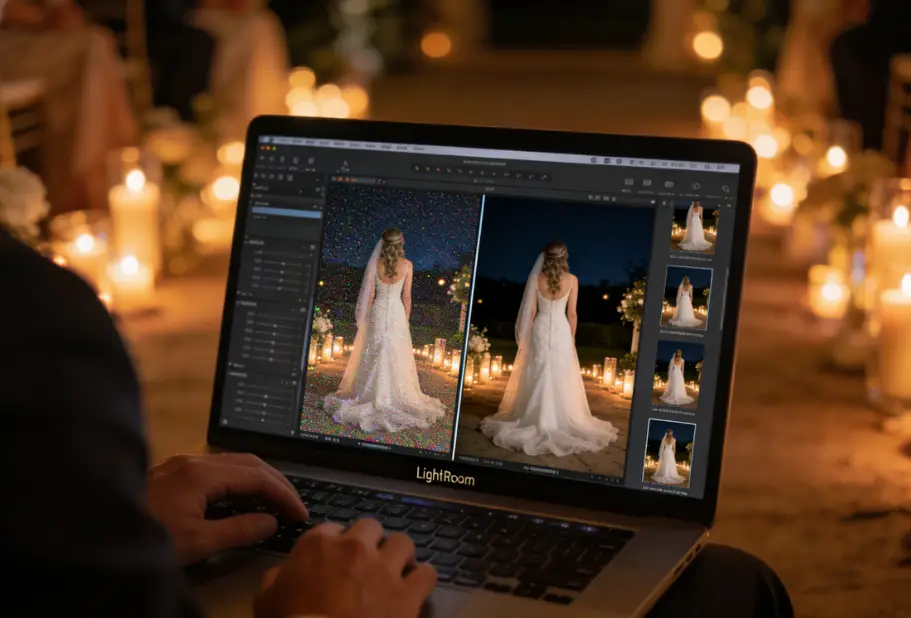
Lucy is a wedding photographer who handles thousands of RAW files daily. Previously, removing noise—especially in dim candlelit venues—could take hours, and maintaining the delicate balance of soft light and bridal gown highlights was challenging.
Last year, her studio implemented Lightroom AI’s noise reduction and detail preservation features. With a simple parameter adjustment or a one-click AI mode, candlelit wedding photos could be transformed into clean, natural images while retaining crucial details ✨.
“When the couple walked down the aisle, the warmth of their hands and the flickering candlelight became even more moving thanks to AI-enhanced images. Seeing them tear up in front of the large screen was the most rewarding part of changing my workflow.” — Lucy
AI significantly reduces post-processing time, allowing her to focus on capturing emotional moments and telling the story behind each wedding.
Pro Tips 🎯
- After AI noise reduction, use local brushes to fine-tune faces or fabric textures to maintain natural sheen.
- For night weddings, apply AI presets first, then fine-tune HDR tone to enhance candlelight depth.
Smart Object Removal: Freedom for Street and Portrait Photography 🏙️🚶♂️
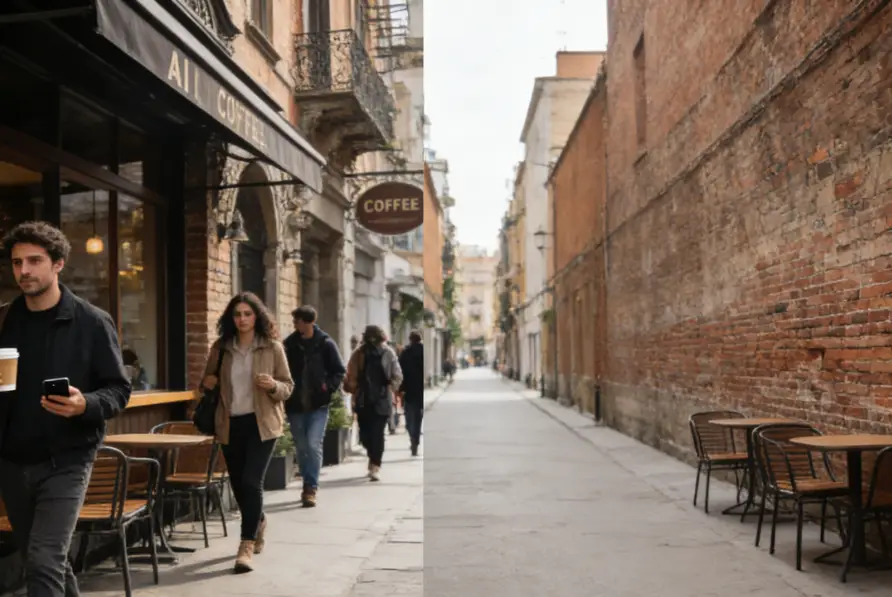
Another common challenge is distracting elements in portrait or street photography. Ben often encounters unintended pedestrians, signs, or objects in his street shots. Previously, he had to use time-consuming brushes and layer masks, which could still leave unnatural edges.
Now, Lightroom’s object removal AI can accurately identify subjects and backgrounds, filling in gaps seamlessly for natural image blending.
Ben once used it on a street shot outside a café. After removing several passersby, the background retained its lively atmosphere without distractions 📷. The final print went viral on social media, and client inquiries tripled overnight!
“AI doesn’t just save me time—it allows me to focus on composition and storytelling.” — Ben
Pro Tips 🎨
- For complex backgrounds, remove objects in stages to maintain natural blending.
- Use edge-softening brushes post-removal for a more realistic subject-background integration.
Travel Photography Made Efficient: Preserving Light and Color 🌄🗻
For travel enthusiasts, AI dramatically improves photo enhancement efficiency. Amy captured a sunset over a snowy mountain, but high ISO introduced noticeable noise. With Lightroom AI:
- One-click noise reduction
- Preservation of subtle mountain ridge highlights and cloud details
- Automatic HDR tone mapping for shadow and color adjustment
- Fine-tuning saturation for natural tonal depth
The result? Dark, noisy photos instantly became vivid, retaining the breathtaking moment 🌅.
“This photo brings me back to the cold wind and golden sunset. AI preserved the memory’s warmth.” — Amy
Additionally, AI can intelligently separate sky, mountains, and water for precise detail enhancement, making travel shots closer to what the human eye sees.
Focusing on Creativity and Content 🎨🖌️
AI doesn’t just enhance images—it transforms the entire photo workflow. Photographers no longer need to manually adjust exposure, contrast, or white balance for every shot. Lightroom AI provides smart presets, allowing creators to focus on:
- Storytelling and emotional expression
- Creative composition and conceptual work
- Final output and organization
Mark, a content creator, uses Lightroom AI to pre-process a full day of advertising shoots, then makes minor adjustments based on the theme. The result? His content production cycle doubled, and clients received both high-quality and punctual deliverables 📈.
“AI handles tedious preprocessing, giving me more time for creative ideas and concept development.” — Mark
Portrait Retouching: Natural Beauty Meets High Efficiency 💁♀️✨
Previously, amateur portraits often appeared dull, requiring intensive manual retouching. Lightroom AI now achieves near-perfect balance in skin smoothing and localized contrast, especially for portrait retouching.
Maggie used AI to enhance a casual street photo:
- Facial brightness and clarity improved instantly
- Skin tone appeared natural and smooth
- Background automatically softened to emphasize the subject
Her Instagram post received over a thousand likes overnight, and brands soon approached her for collaborations 🎯.
Pro Tips
- After AI skin smoothing, slightly adjust eyes and lips for retained expression details.
- Use “Depth Enhancement” to fine-tune background blur for stronger subject emphasis.
Maintaining Control: Combining AI with Manual Adjustments 🔧🖐️
While AI is powerful, Adobe provides full manual control:
- Local erasers
- Brush adjustments
- Automatic object selection
AI handles the basics, while photographers maintain judgment over details, offering flexibility and peace of mind.
Jesse, a photography instructor, emphasizes:
“Let AI do the heavy lifting, then refine details manually for efficiency and professional results.”
Students are amazed: retouching can be fast and professional without spending hours on hair edges 💡.
Smart Catalog Management: From Chaos to Efficiency 📂🤖
Lightroom AI doesn’t just improve editing—it enhances photo catalog management:
- Detect duplicate images
- Intelligent photo classification
- Automatic tag and geolocation suggestions
Kevin’s wedding photography team now delivers polished photos two days earlier weekly, using saved time for creative shoots and team training 💪.
“Previously, organizing over a thousand photos took two full days. Now it’s done in half a day, leaving more time for creative projects.” — Kevin
AI Isn’t Magic, But Expands Creative Possibilities 🌟
While AI is powerful, photographers still need to master:
- Basic exposure techniques
- Composition aesthetics
- Post-processing strategies
Yet, Lightroom AI significantly enhances efficiency and quality, allowing creators to focus on emotional storytelling and visual atmosphere instead of workflow stress.
From school portraits to travel panoramas, product advertisements to wedding albums, AI photo editing empowers photographers to concentrate on creative intent 🎬.
Lightroom AI as a Creative Assistant 🤝💖
Adobe’s AI-powered Lightroom isn’t just a feature update—it’s like having a smart assistant. If editing used to be labor-intensive, now photographers can focus on ideas and emotional expression.
This transformation is changing how we:
- See the world 🌍
- Capture the world 🖼️
- Share the world 📱
Lightroom AI ensures every moment is captured and presented beautifully. Creativity is no longer limited by tedious post-processing—it becomes a process of expression and storytelling.
“AI saves time and allows me to produce more emotionally compelling work.” — Lucy
As AI technology continues to evolve, photographers can preserve professional judgment while dedicating more energy to creativity and emotional impact, fully embracing the philosophy of “telling stories through images.”